
Hilton Digital Key – using your smartphone as your hotel room key
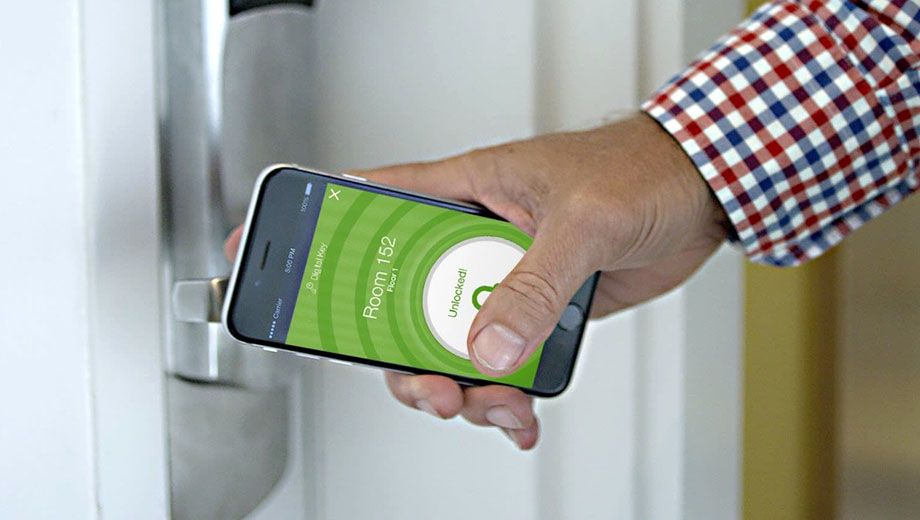
- Choose your room, get your key before arriving at the hotel
- Slow to use and often opens the wrong public lock
- Skip the queues at check-in and head straight to your room
Introduction
Had a long flight and want to head straight to your hotel room, without stopping by reception to get your room key?
At over 2,000 Hilton properties, you can now use your smartphone as your hotel key instead – skipping the lines at check-in to make a beeline for bed.
But is Hilton's Digital Key better than the piece of plastic you normally get at check-in? I put the technology to the test on a recent four-night stay in London: here's how it fared.
Hilton Digital Key: what you need
Hilton Digital Key can work on your smartphone if it's an iPhone 4s or newer and running iOS 8 or later, or is an Android phone with Bluetooth Low Energy support and running Jelly Bean 4.3 or later.
Alternatively, you could use a Bluetooth-enabled iPad running iOS 8 or newer, but unless you want to pull out your tablet every time you encounter a locked door (and will be carting your iPad with you whenever leaving the room), you're best to use a smartphone.
Have the required tech? You'll also need the latest version of the Hilton Honors app on your device, and must be staying at a property that supports the Digital Key system, as not all Hilton hotels do.
When making your booking on the Hilton Honors website, keep your eyes peeled for this key icon near a hotel's name – this indicates that Digital Key is available during your stay:

If you've already made a booking, the Hilton Honors website will show a large "Digital Key offered" icon below the name of each hotel on the Reservations page: so if you don't see it, Digital Key isn't available for that stay.

Accessing your reservation through the Hilton Honors app instead? Just look for the Digital Key box:

Hilton Digital Key: checking-in and getting your key
From 6am on the day before your arrival (local hotel time), you can fire up your Hilton smartphone app and complete an early check-in for your stay.
The process allows you to select a specific room, or you can simply be assigned one:

Closer to your arrival time when the room is ready, the Digital Key feature of your app will come alive, so you'll want to make sure Bluetooth is enabled on your phone to make this work.
As you approach a lock, a green circle will appear – and if the instructions aren't obvious enough, tap inside that circle to open the lock:

While you're waiting, the circle will turn green...

... and when the lock has been opened, the entire screen will go green, and a coloured light will blink on the physical lock, too:

For security reasons, your room number is only displayed on this screen the first time you open the door – after that, you can rename it to something less obvious, such as "Room", and the app also shows which other doors or amenities you can access using your Digital Key:

Hilton Digital Key: road test
During my stay, I came and went from the hotel a number of times for meetings and events, so used the Digital Key quite frequently for access to both the elevator and the room.
Overall, I found the whole process rather clunky and slow: and that's when things were working as expected.
First, to actually use your Digital Key, you need to completely unlock your phone – then, you need to open the Hilton app, dig up your reservation, find the Digital Key box, wait for the Digital Key screen to load, and finally, wait for the phone to 'find' a lock nearby, before you can "press to unlock".
This isn't like Apple Pay where it simply appears on the lock screen, and you can authenticate by using your face or fingerprint: it's much more cumbersome.
Next, when trying to activate the elevator lock in the hotel lobby, the phone kept defaulting to the stairwell nearby instead – so several times, it unlocked a door somewhere else instead of the lift in front of me, and I had to go back to the first screen and start again, manually switching from "Stairwell" to "Elevator" in another screen.
On one occasion, another hotel guest saw how long I was taking to get the lift open, and ducked in front to swipe their (plastic) room key for me, to save the hassle (thank, you, kind stranger)!
What's more, many hotels still require a physical key inserted in the wall to activate the room's electricity – something you don't get by checking-in using Hilton Digital Key, unless you stop past the front desk, which defeats the point:

Yes, as many business travellers know, a business card or folded piece of paper will make the lights turn on instead, but if you've just arrived after a long flight and are juggling suitcases and an open door, your reward for embracing technology shouldn't be creating a makeshift 'power key', just to see where you're going or to plug in and recharge your key-enabled device:

On the plus side, unlike traditional hotel room keys, you don't need to stop by the front desk to have your digital key recoded if you're granted a late check-out or you extend your stay... in theory!
I was originally booked to stay for three nights, but as my flight home was cancelled, I extended my stay by an extra night, and my Digital Key continued to work the next day without me having to do anything.
The Digital Key also kept working on the day of my new departure after the hotel's normal check-out time, as I'd asked for a late check-out
However, this one was a very late, late check-out – 6pm instead of the hotel's usual 12pm – and while the Digital Key was working for most of the day, like many city workers in London, it stopped working at 5pm, which meant another visit to the hotel front desk:

While the hotel had issued me with a plastic key to use throughout my stay, I found that said key would stop working after I'd used the Digital Key with each lock – so once I'd used the Digital Key once to unlock the lift, for example, I couldn't use the plastic key again.
Overall, I wouldn't race to use Hilton Digital Key again. For me, it needs to be a lot more intuitive (think: Apple Pay), and much faster when opening a lock, not to mention that the lock it's opening should also be the lock nearest you: not a side door somewhere else when you're standing in front of a lift.
The only practical, 'time-saving' benefit I can see would be if you arrived at a hotel and found a very long line at check-in – in which case, it could indeed be faster to open up your app and head to your room... but after this experience, I'd probably swing by the desk later on to grab a real key for the rest of the stay!